

Bkper Agent
Ask about your Books, build reports, and work on files with Bkper's AI agent, inside Bkper and with nothing to install.
Bkper Agent works on your Books from inside Bkper. It reads your Books, computes amounts with scripts, builds reports, works on the files you give it, and proposes changes. Bkper runs it in the cloud, so there is nothing to install.
Looking for automatic document processing, without a chat? That is Bookbot, formerly called Bkper Agent.
Open Bkper Agent
-
Open a Book.
-
Click the Agent icon in the Book’s top bar, next to Appearance.
The agent opens over the Book. Restore puts it back in the sidebar beside the Book. When the agent changes the Book, the panel returns to the sidebar on its own, so you see the change. Click the icon again to close it.
-
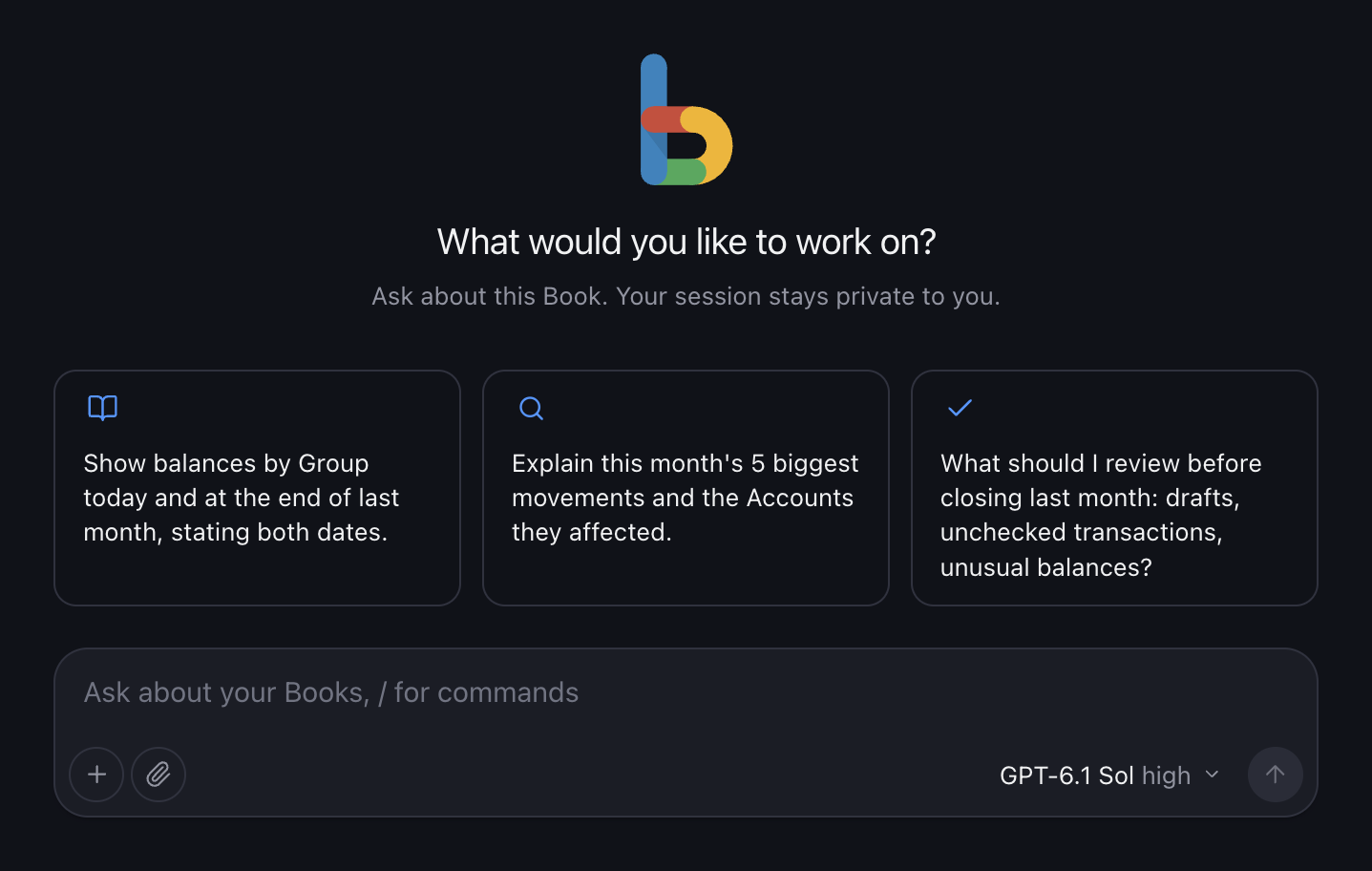
Pick a suggestion or write your own request.
Suggestions come from the Book’s current state, such as a failing bot, pending drafts, or a month with nothing recorded. A click fills the message box; nothing is sent until you send it.
You can also open agent.bkper.app directly to work across all your Books.
Book context
When you write from a Book, each message records that Book and its current query. Moving to another Book or query affects your next message only. Work already running keeps the context it started with.
Work with sessions
- Start a new session with New session or
/new. Sessions are private to you and listed on every device you sign in to. - Steer while it works. Press Enter to steer the current run, or Alt+Enter to queue a follow-up for when it finishes. Remove a queued message before it is delivered.
- Stop a run at any time.
- Fork from here, on any reply, continues in a new session from that reply. The original session stays unchanged.
- Edit in a new session, on any of your messages, starts a new session just before that message, with its text ready to edit.
- Rename or archive a session from its menu, and search the session list.
Forking copies the conversation only. It does not undo file changes or changes already made to a Book.
Type / in the message box for commands:
| Command | Effect |
|---|---|
/new | Start a new session |
/model | Choose a model |
/thinking [level] | Choose a thinking level |
/compact [instructions] | Summarize earlier context, optionally with a focus |
/name <title> | Rename the session |
/stop | Stop the current run |
Choose a model
Pick the model below the message box, or type /model. New sessions start with GPT Sol on paid plans and GPT Luna on the Free plan. Bkper Agent shows how much of the model’s context a session uses and its estimated cost.
Models are included with your plan, and their usage counts against your monthly Bkper AI allowance. See Models and Usage for what each model suits, its rates, and the allowance.
Files
Give the agent files
Attach files to a message in any of three ways:
- Drag and drop them onto the conversation.
- Paste them into the message box.
- Click the paperclip next to the message box and choose them.
Each file uploads as soon as you add it. Send once every file shows as attached; a message can be files only.
- Any format. Bank statements, ERP or payroll exports, spreadsheets, PDFs, ZIP archives, or a format only your other system uses. The agent inspects each file and parses it with a script.
- Images too. The agent looks at images you attach, such as a photo of a receipt or a screenshot, with any model that accepts images, which all current Bkper AI models do. It can also look at a page of a PDF, such as a scanned statement.
- Up to 25 MB per file and 10 files per message.
- Files you attach are private to you. The agent treats their contents as information, never as instructions: text inside a file cannot change its rules or approve a change to a Book.
Files the agent delivers
The agent delivers a file only when you ask for one, such as an export or a report. Files appear in the conversation as downloads, and PDFs also preview there.
- Each file is a copy of the result at that moment. Asking for a change produces a new file.
- A file can be up to 25 MB.
- Downloads are private to you.
How long files are kept
Files you attach and files the agent delivers are kept for 30 days, then deleted. After that, the file still shows in the conversation, but it can no longer be downloaded or used again; attach it again if you need it.
Each person can keep, over the last 30 days, up to 1,000 attached files and 1 GB, and separately up to 1,000 delivered files and 1 GB. Files older than 30 days stop counting, so space frees up on its own.
To keep a file for good, download it, or ask the agent to attach it to a Book. Agent files are separate from Book files; Bkper Agent confirms before attaching a file to a Book.
Starter prompts
Explain how this Book is organized and list anything that looks unusual.Review last month's drafts. Suggest From and To Accounts and flag likely duplicates. Do not post anything.Build last month's income statement as a PDF. Compute every amount with a script and show me the totals you checked.Which bots in this Book failed recently, what triggered each error, and how do I fix it?I attached my bank's export. Show how its lines would be recorded in this Book, and which are already there. Do not post anything.How it works
Each person gets a private Linux workspace in Bkper’s cloud. The agent works there the way you would at a terminal:
- It reads and changes Books with the Bkper CLI, signed in as you.
- It works on the files you attach, in any format, with code.
- It writes and runs scripts in Node.js or Python to compute amounts.
- It keeps working files between sessions, so a script written today can run again next month.
- It delivers results, such as a CSV export or a PDF report, as downloads in the conversation.
Sessions are durable. Closing the window or losing the connection never stops the work. Open the session again, on any device, to see where it is.
The workspace and sessions are yours, not the screen’s. Apps and bots built on the same agent, such as a team’s Slack bot, work in the same workspace, so a session started there continues in Bkper Agent.
What the agent receives
Every request to the model is built in the same order:
- Bkper’s base. The workspace, Bkper’s accounting model, and fixed rules, such as computing amounts with scripts and respecting your Book permissions. Nothing later can relax these.
- Bkper Agent’s instructions. Context on how to work with you: ask one question at a time, explore before asking, and confirm before changing a Book.
- Your message. When you write from a Book, the message also carries that Book and its current query. When you attach files, it carries where each file is in the workspace. Both are labeled as information, never as instructions or permission.
Safety
- Your permissions only. The agent acts as you, with your existing Book permissions. Bkper rejects anything you could not do yourself.
- Confirmed changes. Bkper Agent shows the exact command before any change to a Book and waits for your confirmation. Apps built on the same agent set their own rules.
- No credentials in the workspace. Bkper adds your credentials outside the workspace. The agent never sees a token, so it cannot reveal one.
- Limited network. The workspace reaches Bkper and websites you name, over HTTP and HTTPS. It has no web search and no other network access.
- Deterministic numbers. Balances, statements, reconciliations, and taxes come from scripts on your Book data, not from the model’s memory.
Raw AI output is still not final for balances, statements, or filing decisions. Review the result against your Books before you rely on it.
Privacy
Bkper keeps, for each person:
- sessions: messages, replies, and the steps the agent took;
- files you attach and files the agent delivers, for 30 days;
- the workspace’s files, backed up between sessions.
Only you can open your sessions and files. Archiving a session hides it from the list. Attached and delivered files are deleted after 30 days. Deleting sessions is not available yet.
Model calls follow the Bkper AI privacy and retention rules.
Choose an AI path
| You want to… | Use |
|---|---|
| Turn documents into draft transactions, without a chat | Bookbot |
| Keep using ChatGPT or Claude | Your AI assistant |
| Work with files and tools on your own computer | Bkper CLI Agent |
| Build an app or bot on the same agent | Managed Agent API |