

Bkper CLI Agent Security
Run the Bkper CLI Agent safely with sandbox isolation, credential protection, and Bkper permission scoping.
The Bkper CLI Agent runs in your terminal with local workspace access and the Bkper permissions of the account used by bkper auth login. A misconfigured local agent can read credentials, overwrite files, or modify live financial data.
This page covers the Bkper CLI Agent. Other AI tools and hosted connectors should be secured with their own vendor-specific controls.
Three layers of protection keep Bkper CLI Agent work safe:
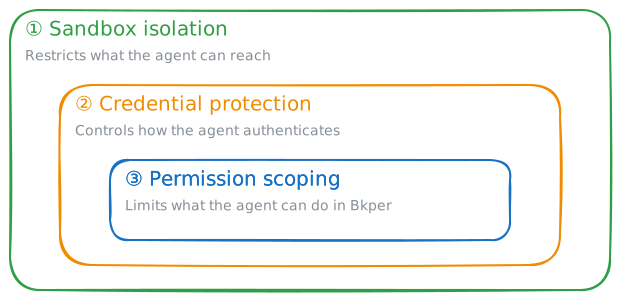
Sandbox isolation
The most effective way to limit the Bkper CLI Agent is to run it inside a sandbox — a container, micro-VM, or OS-level boundary that restricts what it can reach.
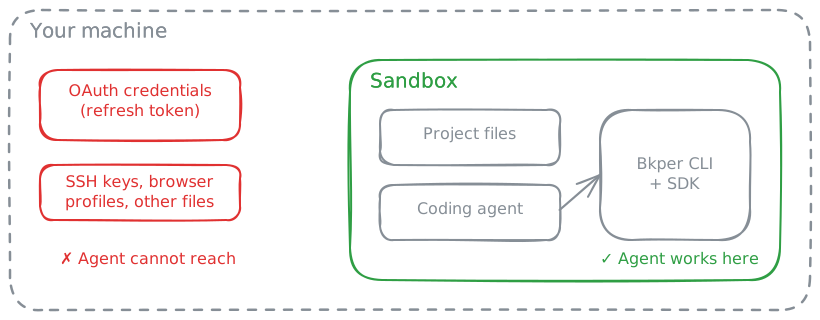
The Bkper CLI Agent may run local shell commands without per-command approval. Per-command approval sounds safe, but it creates friction that kills productivity when the agent needs to run builds, tests, and CLI commands.
That local autonomy should stay inside a restricted boundary. For Bkper writes, the agent should still show the plan or exact command and wait for your confirmation before modifying live financial data.
Container or micro-VM sandboxing
Use a container or micro-VM boundary when the Bkper CLI Agent works with real data. We use Docker with DevContainers and DevPod to get reproducible, isolated environments that work the same way locally and in the cloud.
Other sandbox tools worth knowing about:
- Docker Sandboxes — microVM-based sandboxes built for coding agents, with host-side credential injection
- Gondolin — lightweight micro-VMs with programmable network egress and secret injection
- Podman — rootless, daemonless Docker alternative
Credential protection
Even inside a sandbox, the Bkper CLI Agent can access any credentials present in that environment. The Bkper CLI stores OAuth credentials (including a refresh token) at ~/.config/bkper/.bkper-credentials.json. If the agent can read that file, it can make API calls as you.
Host-side credential injection
The most secure option. Your credentials never enter the sandbox — an HTTP proxy on the host intercepts outbound API requests and injects authentication headers before forwarding them. Docker Sandboxes and Gondolin implement this pattern.
This works well with the Bkper CLI because only an explicit Bkper login—bkper auth login or /login inside the agent—starts the interactive device authorization flow. Regular CLI commands can proceed without local credentials and let the proxy add authentication.
Login inside the sandbox, then logout cleanly
This is the simplest practical workflow for many teams. Authenticate inside the sandbox with a secondary low-permission account:
bkper auth loginWhen you are done, revoke the refresh token and remove the local credentials:
bkper auth logoutbkper auth logout does both:
- revokes the stored refresh token remotely when possible
- clears local credentials from disk
If remote revocation fails, the CLI still clears local credentials and warns that remote cleanup may need manual follow-up.
Permission scoping
The Bkper CLI authenticates as the user who ran bkper auth login. If that user is the book owner, the Bkper CLI Agent has owner-level access — it can delete accounts, change sharing settings, and modify lock dates.
Use a secondary account with limited permissions instead. Log into the CLI with a different Google account (for example, a personal Gmail), then share the target book with that account at the appropriate level:
| Permission | What the agent can do | Good for |
|---|---|---|
| View Only | Read accounts, transactions, and balances | Read-only scripts, reporting, analysis |
| Record Only | Create and delete drafts | Automated data entry with human review |
| Record & View | Record drafts, post transactions, view data | Most development and testing workflows |
| Editor | Full data management (accounts, groups, transactions) | Building apps that manage book structure |
Avoid granting Owner permission to the Bkper CLI Agent account. Owner access allows sharing changes, closing-date modifications, and other irreversible operations that should remain under direct human control.
For the full permissions matrix, see Book Sharing — Permissions.
Combining layers
A typical secure setup:
- Sandbox — Bkper CLI Agent runs inside a DevContainer, Docker Sandbox, or micro-VM with only the project directory mounted
- Credentials — either injected from the host, or authenticated inside the sandbox and explicitly revoked with
bkper auth logoutwhen work is done - Permissions — CLI authenticated as a secondary account with Record & View access
No single layer is bulletproof, but together they limit exposure to a narrow, time-bound, permission-scoped window.
MCP servers you add
Each MCP server you connect lets the agent act on that service with your permissions. A sandbox can’t limit a remote service, so:
- Add only servers you trust, with read-only or narrow access when the service offers it.
- Treat
~/.pi/agent/mcp-auth.jsonlike your Bkper credentials. It holds your MCP sign-ins;bkper agent mcp logout <name>clears one. - Remove servers you no longer use with
bkper agent mcp remove <name>.